

Installation
Source: Intuition-6 Instruction Manual Rev. H, Pages: 11–35Enclosure Mounting
The controller should be wall mounted at eye level on a vibration-free surface using all four mounting holes.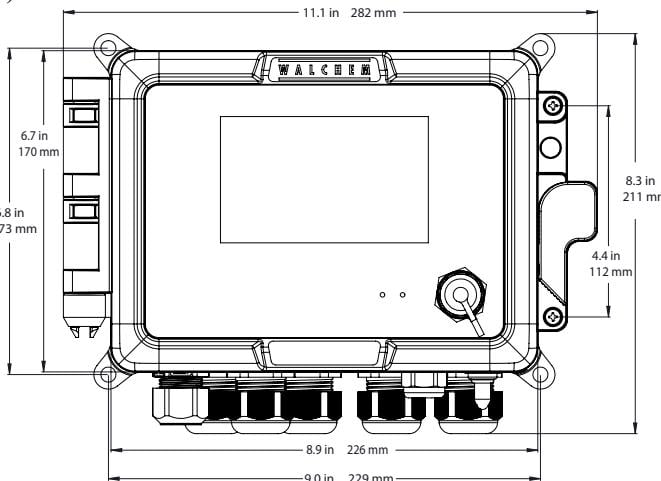
Enclosure dimensions and mounting hole locations
Mounting Requirements
- Use M6 (1/4” diameter) fasteners appropriate for the wall material
- Do not install where the display will be exposed to direct sunlight
- Consider maximum operating ambient temperature of 131°F (55°C)
Required Clearances
Enclosure Dimensions
Sensor Installation
Use these guidelines to place and mount sensors for accurate readings.General Guidelines
Position sensors where:- An active, representative sample of water is available
- Sensors can easily be removed for cleaning
- Air bubbles will not be trapped within the sensing area
- Sediment or oil will not accumulate on the sensing surfaces
In-Line Sensor Mounting
For sensors installed in a flow manifold:1
Tap off recirculation pump
Connect to the discharge side of the recirculation pump
2
Ensure adequate flow
Provide minimum 1 GPM flow through the flow switch manifold
3
Orient flow direction
Flow must enter from the bottom to close the flow switch
4
Route return line
Return line must go to a point of lower pressure to ensure flow
5
Install isolation valves
Install isolation valves on both sides for maintenance access
Submersion Sensor Mounting
For sensors submerged directly in the process:- Mount sensors firmly to the tank
- Protect cable runs with plastic conduit sealed at the top
- Position in an area of good solution movement
- Locate for rapid response to treatment chemicals without seeing injection spikes
Sensor-Specific Guidelines
Use the sensor-specific notes below to confirm cabling and placement limits.Contacting Conductivity Sensors
- Maximum cable length: 250 ft (76 m); less than 25 ft (8 m) recommended
- Use shielded cable for all extensions
- Maintain 6” (15 cm) separation from AC voltage wiring
Electrodeless Conductivity Sensors
- Maximum cable length: 120 ft (37 m); less than 20 ft (6 m) recommended
- Maintain 6” (15 cm) of sample around the sensor
- Keep nearby conductive items consistently positioned
- Do not install in the path of stray electrical currents
pH/ORP Electrodes
- Maximum cable length: 1000 ft (305 m) with junction box
- Install with measuring surfaces always wet (U-trap recommended)
- Mount at minimum 5° above horizontal with measuring surface down
- Flow velocity must be less than 10 ft/sec (3 m/sec)
Disinfection Sensors
- Maximum cable length: 100 ft (30 m) with junction box
- Flow cell inlet must be from the bottom (3/4” x 1/4” reducing bushing)
- Do not remove the inlet bushing—it provides required flow velocity
- Outlet must vent to atmosphere (max 1 atm back pressure)
- Install with measuring surface down, at least 5° above horizontal
Boiler Installation
Follow these requirements when installing sensors on boiler systems.Important Notes
Review these boiler-side constraints before selecting the sampling location.- Minimum water level must be 4-6” above the skimmer blowdown line
- Maintain 3/4” minimum pipe ID from boiler tap to electrode
- Use full port valves only—any restriction causes flashing
- Keep distance from boiler tap to electrode under 10 ft
- Mount electrode in cross fitting on horizontal pipe run
- Install flow restriction downstream of electrode and control valve
Blowdown Sizing
Use the calculation below to size blowdown for your boiler.Determine Blowdown Rate
Continuous vs. Intermittent Sampling
Use intermittent sampling when:- Boiler operation is intermittent
- Required blowdown rate is less than 25% of smallest valve/orifice capacity
- Boiler operates 24 hours/day
- Required blowdown rate exceeds 25% of smallest valve/orifice
Electrical Installation
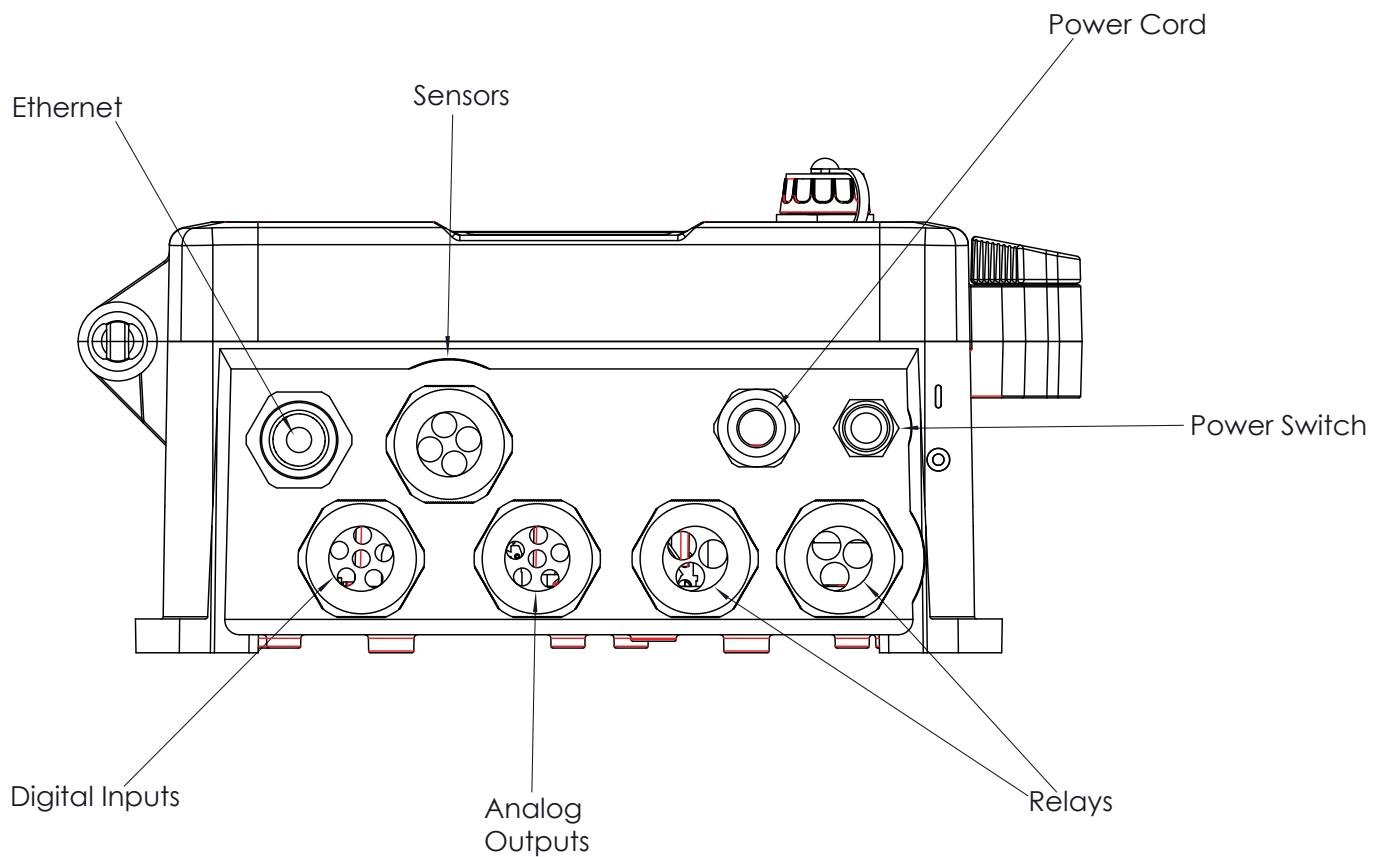
Controller connection points (bottom view)
Safety Precautions
Power Supply Wiring
The controller accepts 100-240 VAC, 50/60 Hz input power.Prewired Models
- Supplied with 8 ft, 18 AWG power cord with USA plug
Hardwired Models
Relay Output Wiring
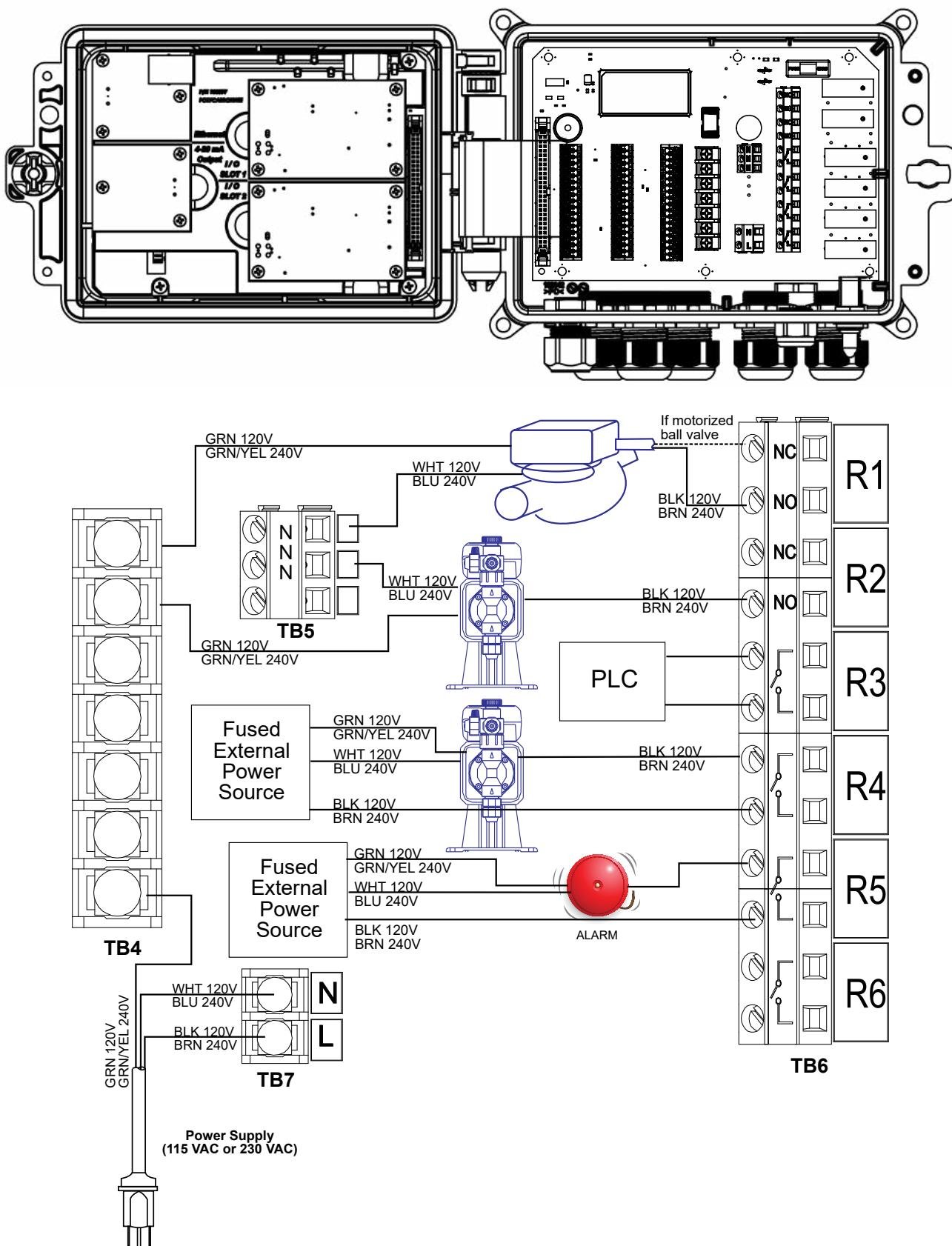
Relay output wiring for powered relay models
Powered Relay Models (W6000, W6A00)
All six relays switch line voltage to external loads.
Connect each load:
- Switched line from TB6 relay terminal
- Neutral from TB5
- Ground to TB4
Total current for all six powered relays must not exceed 6 A. All relays share a common fuse.
Dry Contact Relay Models (W6100, W6B00)
Dry contact relays can switch external power sources. Route external power through fused external source terminals.Sensor Input Wiring
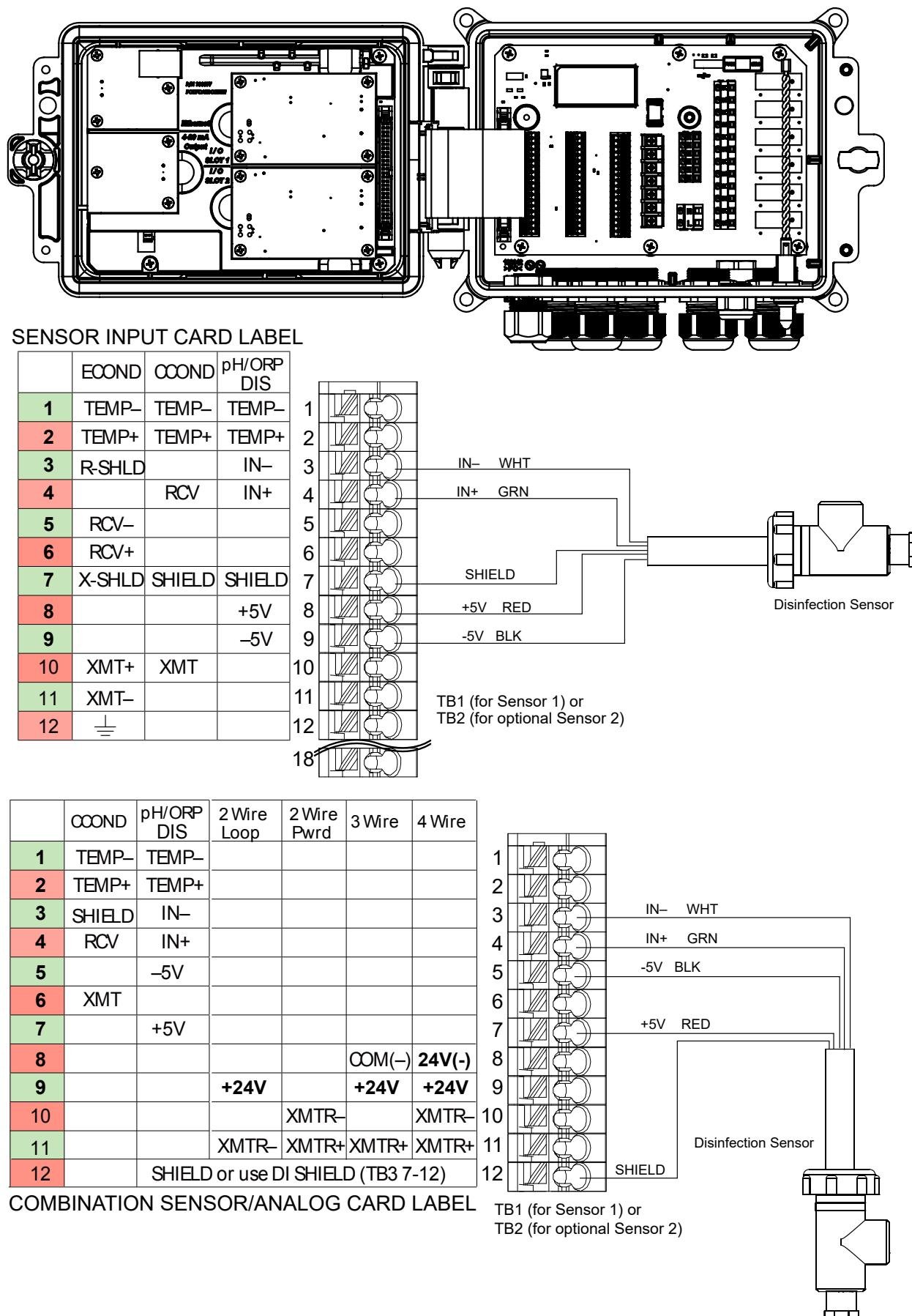
Sensor input card terminal assignments
Contacting Conductivity
Electrodeless Conductivity
pH/ORP/ISE Sensors
Disinfection Sensors
4-20 mA Transmitter Wiring
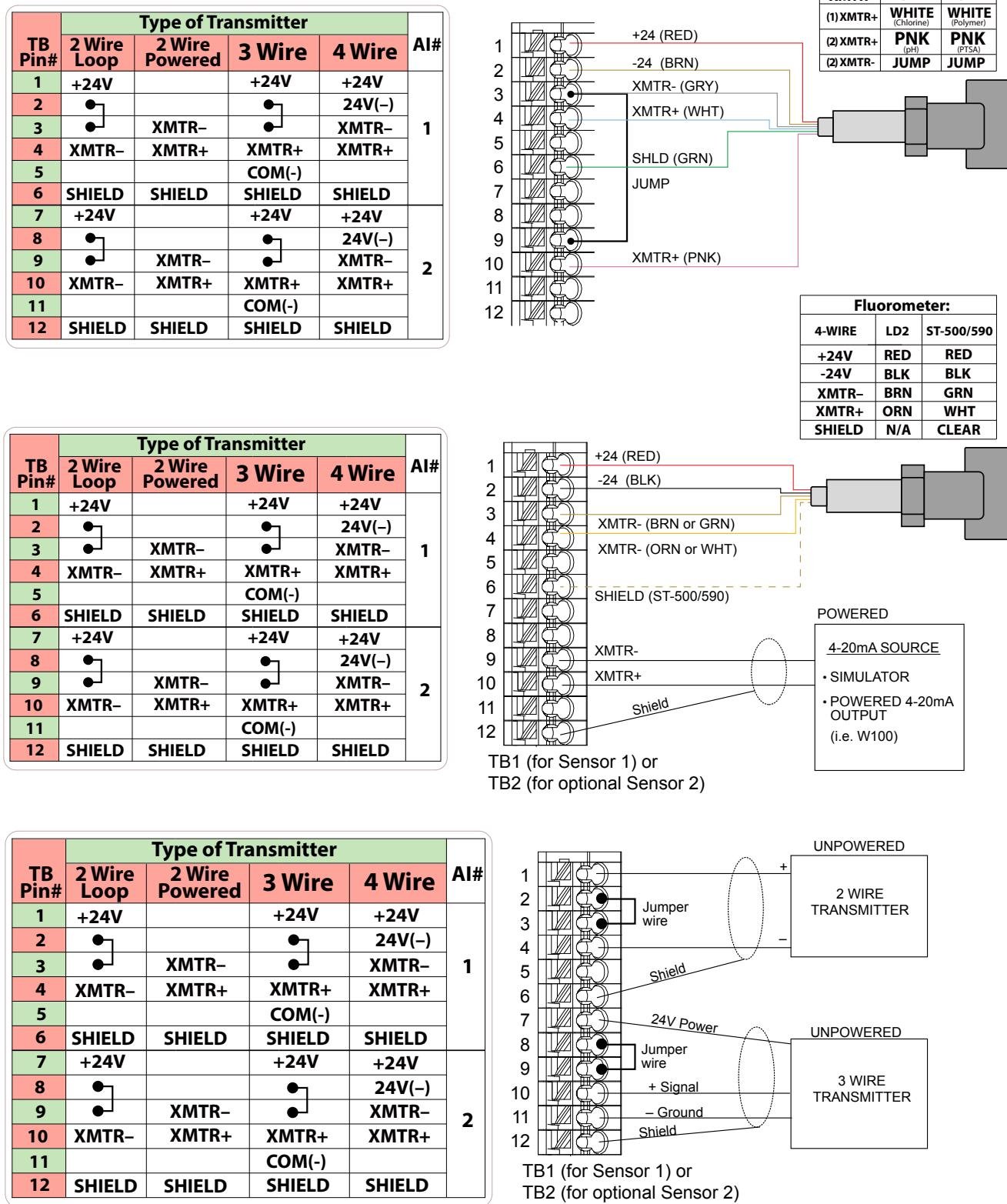
4-20 mA transmitter wiring configurations
- 2-Wire Loop Powered
- 2-Wire Self-Powered
- 3-Wire
- 4-Wire
Jumper between terminals 2-3 (or 8-9).
Digital Input Wiring
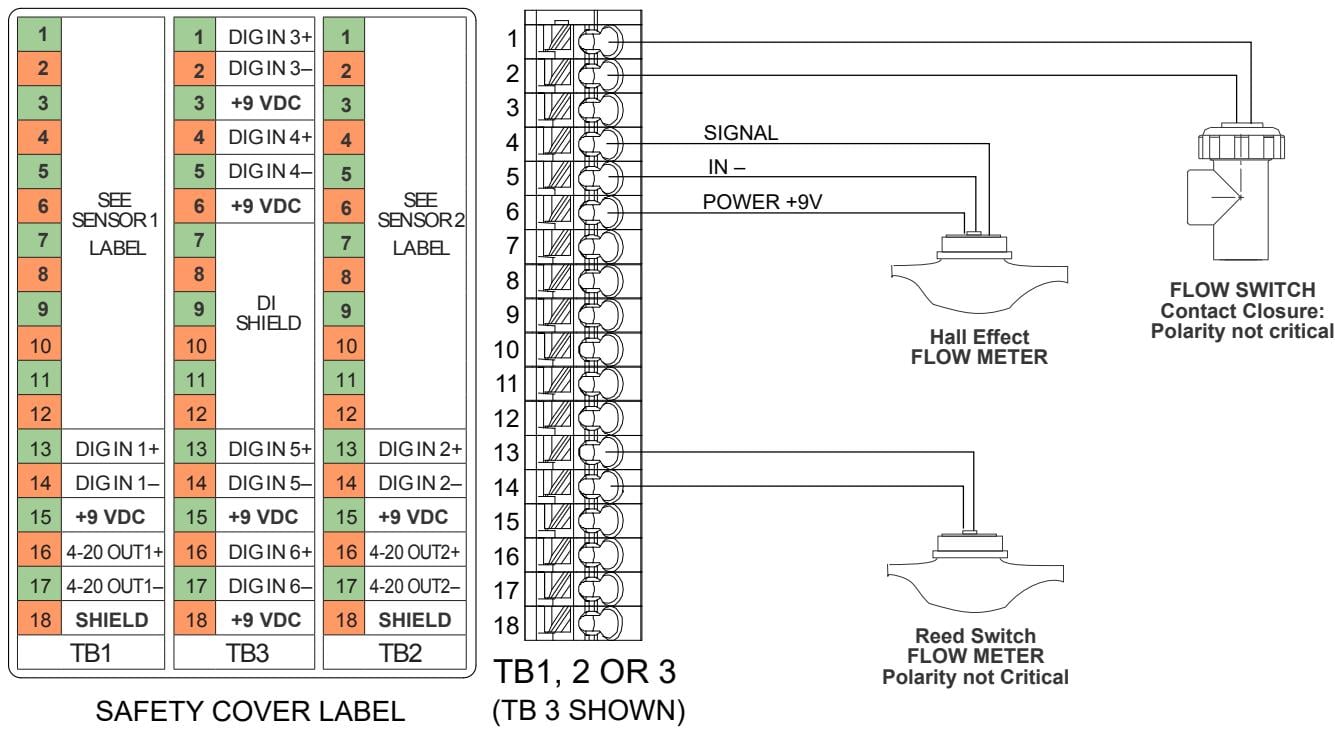
Digital input terminal blocks and flow meter wiring
Flow Switch (Dry Contact)
Connect to DI+ and DI- terminals. Polarity not critical.Hall Effect Flow Meter
Analog Output Wiring
Wiring Best Practices
Use stranded, twisted, shielded pair wire (22-26 AWG) for:
- Flow meter contactor inputs
- 4-20 mA outputs
- Remote flow switches
1
Maintain cable separation
Route sensor cables at least 6” from AC power wiring
2
Use proper strain relief
Use proper cable glands and strain relief at enclosure entry points
3
Minimize cable length
Keep cable runs as short as practical to reduce noise pickup
4
Label all connections
Label all wires for future reference and troubleshooting
Sources
Intuition-6 Instruction Manual Rev. H
Pages 11–35 • February 2024