

Operation
Source: Intuition-6 Instruction Manual Rev. H, Pages: 36–64 The Intuition-6 features a 5” color touchscreen for all configuration and monitoring functions.Front Panel
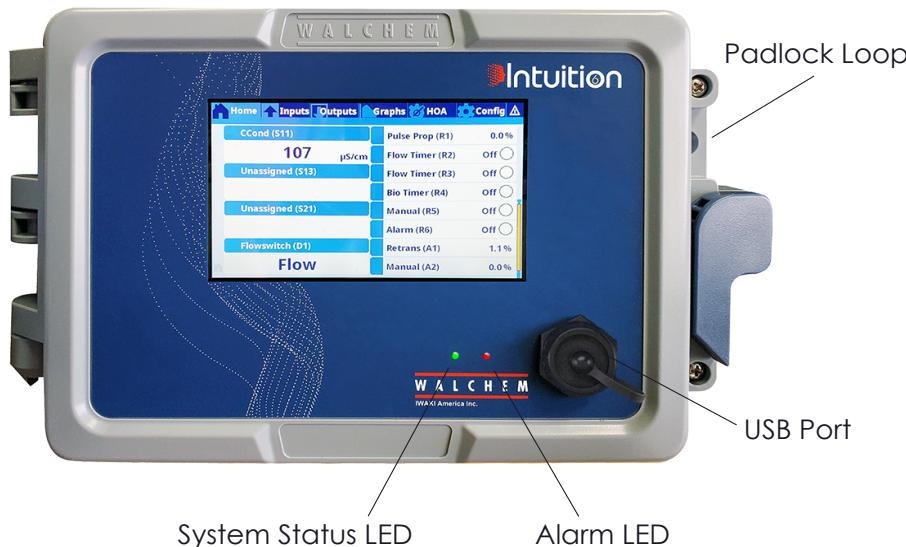
Front panel with home screen showing inputs and outputs
Startup
1
Apply power
Turn on the power switch. The display will show the Walchem logo during initialization.
2
Initial configuration
On first startup, configure:
- Date and time
- Language preference
- Input and output assignments
3
Verify sensors
Check that all connected sensors display valid readings on the home screen.
4
Program outputs
Configure each relay for the desired control mode before placing in Auto.
Shutdown
For planned shutdowns:1
Disable outputs
Place all relay outputs in Off mode via the HOA menu
2
Wait for processes
Wait for any active processes to complete (biocide timers, bleed cycles)
3
Power off
Turn off the power switch on the front panel
4
Disconnect power
Disconnect power at the source if servicing the controller
Home Screen
The home screen displays a customizable summary of inputs and outputs. Touch any displayed value to access its detail screen.Customizing the Home Screen
- Press and hold anywhere on the home screen for 3 seconds
- Use the Edit icons to:
- Split cells to show more items
- Merge cells to show fewer, larger items
- Move items up or down
- Delete items from display
- Touch the checkmark to save changes
Screen Icons
Menu Structure
- Alarms
- Inputs
- Outputs
- Config
- HOA
- Graphs
Displays all active and recent alarms. Touch any alarm for details.Alarm Types:
- Sensor alarms (Hi/Hi, Hi, Lo, Lo/Lo)
- Output timeout alarms
- Flow verify alarms
- Communication errors
- Calibration reminders
Hand-Off-Auto (HOA) Control
Each output can be set to one of three states:Hand Time Limit can be configured to automatically return an output from Hand to its previous state after a set time—prevents forgetting a pump in manual mode.
Sensor Calibration
Calibration maintains measurement accuracy. Access calibration from the Input menu by touching the calibration icon.- Conductivity
- pH
- ORP
- Disinfection
- Analog 4-20mA
One-Point Process Calibration:One-Point Buffer Calibration:
1
Take grab sample
Take a grab sample while viewing the live reading
2
Measure in lab
Measure sample conductivity with a lab meter
3
Enter value
Enter the lab value in the controller
4
Confirm
Touch Confirm to save calibration
1
Prepare standard
Place sensor in known conductivity solution
2
Enter value
Enter solution value
3
Stabilize
Wait for reading to stabilize
4
Confirm
Touch Confirm to save calibration
Sensor Settings
Each sensor type has configurable parameters:Common Settings
Conductivity-Specific
pH-Specific
4-20 mA Transmitter
Digital Input Configuration
Configure each digital input type using the settings below.DI State (Flow Switch/Interlock)
Flow Meter (Contactor)
Flow Meter (Paddlewheel)
Feed Monitor
Ethernet Configuration
Use these settings to connect the controller to the network and enable web/email features.Network Setup
- Go to Configuration → Ethernet Settings
- Select DHCP or enter fixed IP address
- Configure subnet mask and gateway
- Test connection
Web Interface Access
- Connect controller to network
- Enter IP address in web browser
- Log in with controller password
- Access all configuration via web pages
Email Configuration
Configure up to 8 email addresses for:- Alarm notifications
- Periodic datalog reports
- Calibration reminders
Email requires SMTP server configuration. Contact your IT department for the correct settings.
USB Functions
Insert a USB flash drive to access:Software Upgrade
- Download latest firmware from Walchem website
- Copy to USB drive root directory
- Insert drive, navigate to File Utilities
- Select Software Upgrade
Config File Backup/Restore
- Export configuration to USB
- Import to another controller for quick setup
- Useful for multi-controller installations
Datalog Export
- Select date range
- Export to CSV format
- Open in Excel or similar spreadsheet
Sources
Intuition-6 Instruction Manual Rev. H
Pages 36–64 • February 2024