

Startup
Source: DICE IOM Manual V12E, Pages: 18–23If valves were factory preset (labeled with target pressure), skip the adjustment procedures and proceed to calibration.
Pump Priming
The bleed valve (32) on the left side of the DICE module helps evacuate trapped gas between the pump outlet and back pressure valve.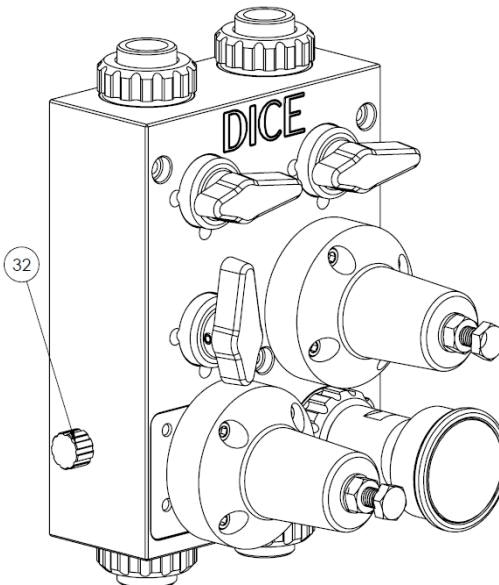
Bleed valve location on DICE module
1
Start the pump
Begin pump cycling while observing for flow.
2
Open the bleed valve slightly
Partially unscrew the bleed valve (32) until fluid begins passing through. Only slight opening is needed—do not fully unscrew.
3
Close the bleed valve
Once fluid flows, close the bleed valve and proceed with setup.
Pressure Relief Valve Adjustment
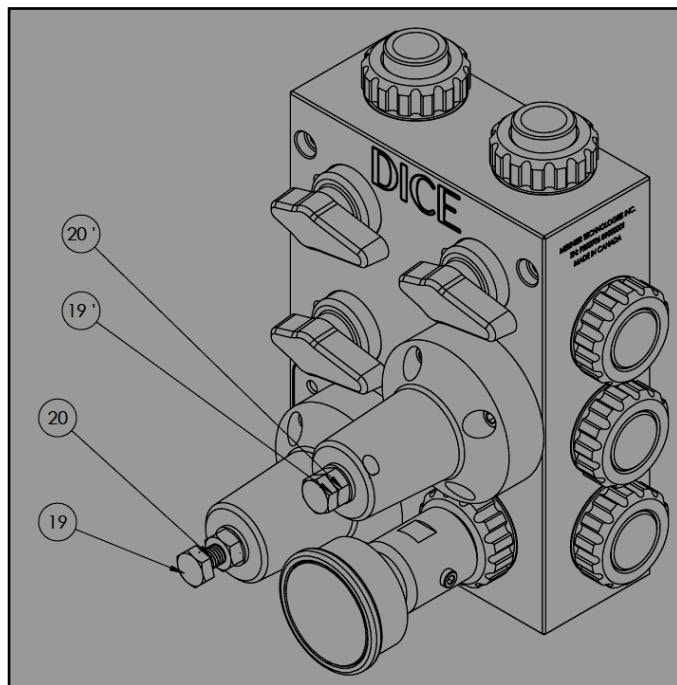
Pressure relief valve adjustment components
1
Close all ball valves
Set all three (DS) or four (DM) ball valves to the closed position.
2
Pre-load the back pressure adjuster
Screw the back pressure adjustment screw (19’) completely in (clockwise).
3
Start the pump
Run the pump until fluid passes through the pressure relief valve into the evacuation port.
4
Set the pressure relief set point
Use adjustment screw (19) to obtain the desired relief pressure. Clockwise increases the set pressure.
5
Lock the setting
Tighten counter nut (20). Max torque: 35 in-lb.
6
Depressurize
Stop the pump and slowly open the evacuation ball valve to release system pressure.
Back Pressure Valve Adjustment
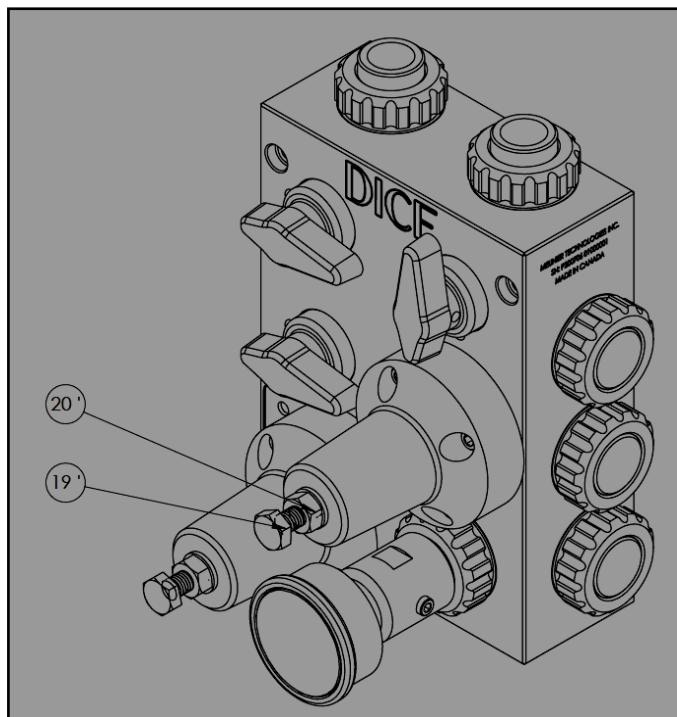
Back pressure valve adjustment components
1
Set valve positions
Close the evacuation and calibration column valves. Open the injection valve.
2
Start the pump
Run the pump until fluid passes through the back pressure valve.
3
Set the back pressure set point
Initially unscrew adjustment screw (19’), then adjust to desired pressure. Clockwise increases the set pressure.
4
Lock the setting
Tighten counter nut (20’). Max torque: 35 in-lb.
Adjustment components reference
Adjustment components reference
Dosing Pump Calibration
Complete back pressure and pressure relief valve adjustment before calibrating the pump.- DICE DS Calibration
- DICE DM Calibration
1
Set valve positions
Close the evacuation valve (3) and injection valve (1). Open the calibration column valve (2).
2
Perform calibration
Follow your dosing pump manufacturer’s calibration procedure using the calibration column.
3
Drain the calibration column
Open the evacuation valve (3) to empty the calibration column. Vent the top of the calibration column to enable complete drainage.
4
Return to injection mode
Close the evacuation valve (3) and calibration column valve (2). Open the injection valve (1).
DS Valve Positions
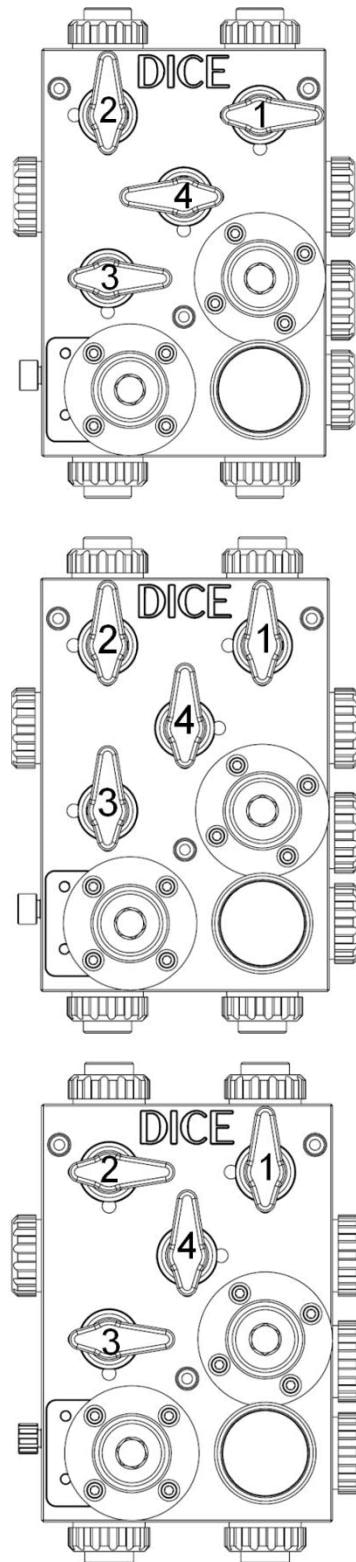
The top of the calibration column must be vented to atmosphere to enable gravity drainage through the evacuation valve.
Post-Startup Verification
1
Verify pressure
Confirm the pressure indicator reads the back pressure set point.
2
Check for leaks
Inspect all connections for leaks.
3
Confirm valve positions
Verify all ball valves are in the correct position for normal operation.
4
Document set points
Record the set points for future reference.
Related Products
DICE DS — Suction Lift
1/2” module for suction lift applications
DICE DM — Flooded Suction
1/2” and 1” modules for flooded suction
Sources
DICE IOM Manual V12E
Pages 18–23 • July 2022